EmployTest Logo

Microsoft Office Skills Test for Employment

Our interactive Microsoft Office skills test for employment shows you what they can actually do, not just what they claim on a resume. Find out if your candidates can really use MS Office before you hire them.

  • Tests Word, Excel, PowerPoint, and Outlook in one session
  • Task-based format – no downloads needed
  • Done in about 20 minutes
  • Score report sent to you as soon as the test is finished
  • Buy tests in blocks – scales with how many people you hire

All our tests follow EEOC guidelines. They are fair, job-relevant, and legally defensible. Try the Microsoft Office Skills Test for Employment free, no credit card needed.

The Cost of Hiring Without Verified Office Skills

Skill gaps are one of the top reasons new hires fail. According to Microsoft Workplace Analytics, weak software skills raise training costs and lead to early turnover. Our Microsoft Office assessment helps you catch those gaps before day one.

When you skip skills testing, you risk:

  1. Higher training costs to fill skill gaps after hiring
  2. Slower teams when new hires need constant help
  3. More turnover when people are placed in jobs beyond their skill level

Our test is built and reviewed by I/O psychologists and HR experts with decades of experience in pre-employment testing.

“A 2023 SHRM report found that a single bad hire costs an average of $4,700 — not counting lost productivity.” — SHRM, The Real Costs of Recruitment


Manager spending extra time training a new hire due to missing Microsoft Office skills

Skills Covered in the Microsoft Office Skills Assessment

This Microsoft Office skills assessment doesn’t ask candidates what they know; it asks them to show you. Every task is pulled from real work scenarios, not textbook examples. Here’s what each module tests:

Microsoft Word. Can they format a professional document from scratch? Apply heading styles, run a mail merge, and use track changes correctly?

Microsoft Excel. Can they write formulas without help? Sort and filter large data sets, and build a basic pivot table?

Microsoft PowerPoint. Can they build a clean, on-brand slide deck? Apply a template, add animations, and keep design consistent?

Microsoft Outlook. Can they manage a busy inbox? Set up folder rules, schedule meetings, and assign tasks without prompting?

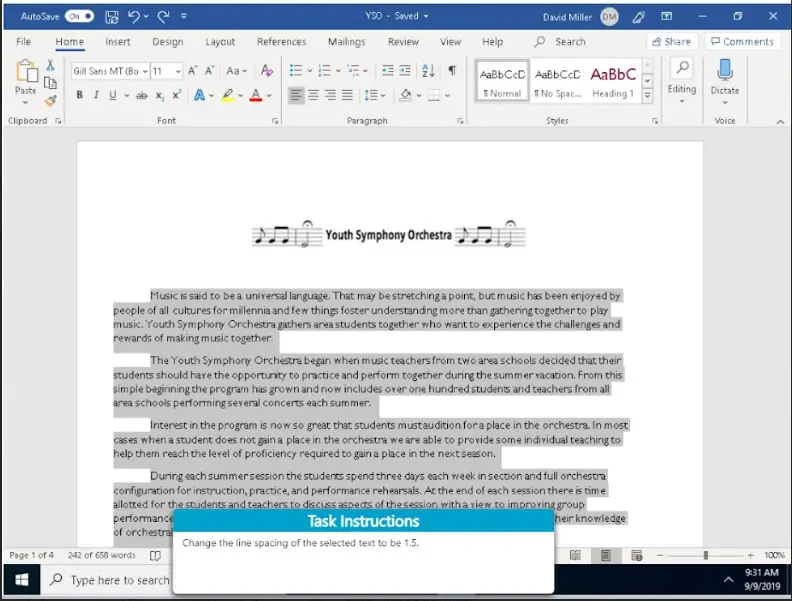
How Microsoft Office Testing Works at EmployTest

For You (The Employer)

  1. Log in to your dashboard and send the test link to the candidate
  2. No setup needed, everything runs on its own
  3. Get a full score report the moment they finish
  4. See overall score, skill level, right vs. wrong answers, and time per question
  5. Compare candidates side by side using percentile rankings

For the Candidate

  1. Works in any browser, no downloads or installs
  2. Short tutorial at the start so they know what to expect
  3. Tasks are based on real work situations, not theory
  4. Takes about 20 minutes to finish
Candidates never see their scores. Results go straight to you, keeping the process fair and private.
EmployTest employer dashboard showing how to send a Microsoft Office test to a candidate

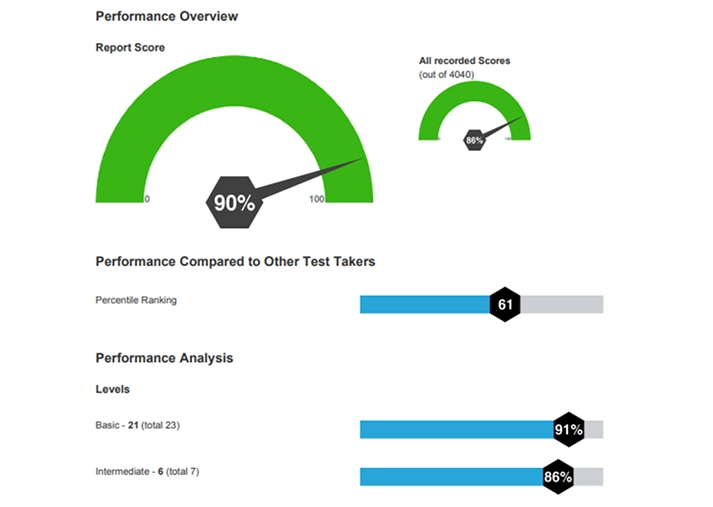
Inside Your Score Report

Every report gives you clear, useful data sent to your email right away and saved in your dashboard for 12 months:

Overall Score — percentage correct across all four Office programs

Skill Level — Beginner, Intermediate, or Advanced

Per-Question Breakdown — correct/incorrect and time spent on each task

Percentile Ranking — how this candidate compares to others in the EmployTest pool

App-Level Detail — separate skill level for Word, Excel, PowerPoint, and Outlook


Roles That Benefit Most from Office Skills Testing

HR teams use this test most often when hiring for:

  1. Administrative and executive assistants
  2. Office managers and operations coordinators
  3. Data entry clerks and billing specialists
  4. Customer service reps who use CRM or ticketing tools
  5. Accounting and finance staff who work heavily in Excel
  6. Project coordinators who use Outlook and PowerPoint regularly

Not sure which Office programs matter most for a role? Read our HR guide: “Which Microsoft Office Skills Matter Most by Job Role.


Administrative assistants, finance staff, and project coordinators who benefit from Microsoft Office skills testing

Only Need to Test One App? Start Here

The full suite test is ideal for roles that use all four programs daily. But if you’re hiring for a more focused role, a standalone app test may be the better fit. Match the test to the job:

Excel Assessment Test — Best for finance, accounting, and data-heavy roles

Word Skills Test — Best for roles that involve heavy document creation or editing

Outlook Test — Best for admin, coordinator, and customer-facing roles that run on email

PowerPoint Test — Best for roles that pitch, present, or report to stakeholders

Teams Test — Best for remote or hybrid roles where Teams is the main communication tool

Guide to choosing a standalone Microsoft Office app test based on job role
4.7/5 | 137 reviews on Capterra

“Would recommend! Easy to use for the user and the client. I enjoy that results are emailed in real-time and that they are available in the dashboard.”

Stephanie R., Senior HRG
EmployTest Is A Top Rate Tool Based On 2025 Capterra Shortlist
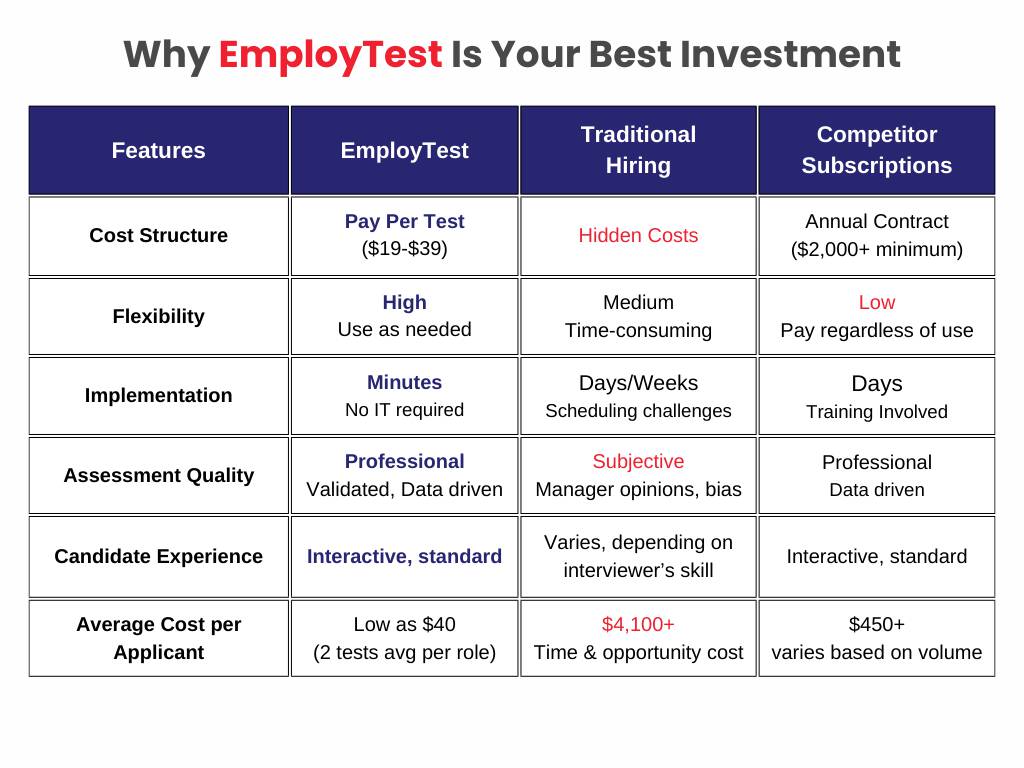
Employtest Comparison

Frequently Asked Questions

What does this test actually measure?

It measures how well a candidate can do real Office tasks like formatting a Word document, writing an Excel formula, building a PowerPoint slide, and managing email in Outlook. You get proof of skill, not just a self-reported level.

How is this different from a Microsoft certification?

Certifications test what someone knows. This test measures their actual microsoft office proficiency, what they can do on the job, not what they studied for an exam. Candidates complete real work tasks, the same kind they’d face in your office. No studying or prep needed.

How long does it take?

About 20 minutes for the full test. If you only need to test one or two Office programs, we offer shorter, app-specific versions too.

Can it test both beginners and experienced candidates?

Yes. The test adjusts to each person’s skill level as they go. It works just as well for a junior data entry clerk as it does for a senior executive assistant.

Does the candidate need to have Office installed?

No. The test runs fully in the browser. Candidates can use any device; no software installs needed.

How much does this cost?

Pricing is simple and flexible as your needs change. Each test completed uses one test credit. (See pricing for credits)

Can I get a free sample before I purchase?

Yes, just visit Try for Free to provide your information and we’ll send a free sample of the test you request.

How it Works

Wicon 1
BUY TEST CREDITS
Wicon 2
SIGN INTO DASHBOARD
Wicon 3
CHOOSE TESTS
Wicon 4
EMAIL TEST SESSIONS